Private dashboard by role
Administrators, managers and clients work with interfaces adapted to their permissions and responsibilities.
Your professional website for 360 USD: domain, hosting, maintenance and 2 email accounts included the first year.
No lock-in contract, with real people behind it. We want you to be a happy client.
Give your business its own place on the internet. This is the offer to get started.

WordPress plugin
A private file manager to create secure, organized and easy-to-manage client portals inside WordPress.
Centralizes clients, managers, folders, permissions, uploads, downloads, notifications and document activity from a private dashboard built into your own website.
Who it’s for
What it solves
PCF Manager centralizes files, folders, users, permissions and activity in a private dashboard built into your own website. Each client only accesses their own documentation, while administrators and managers keep control over the structure, uploads, downloads and visibility of every file.
It’s a solution designed for businesses that need to exchange private documents without relying on scattered emails, external links or shared folders that are hard to control.
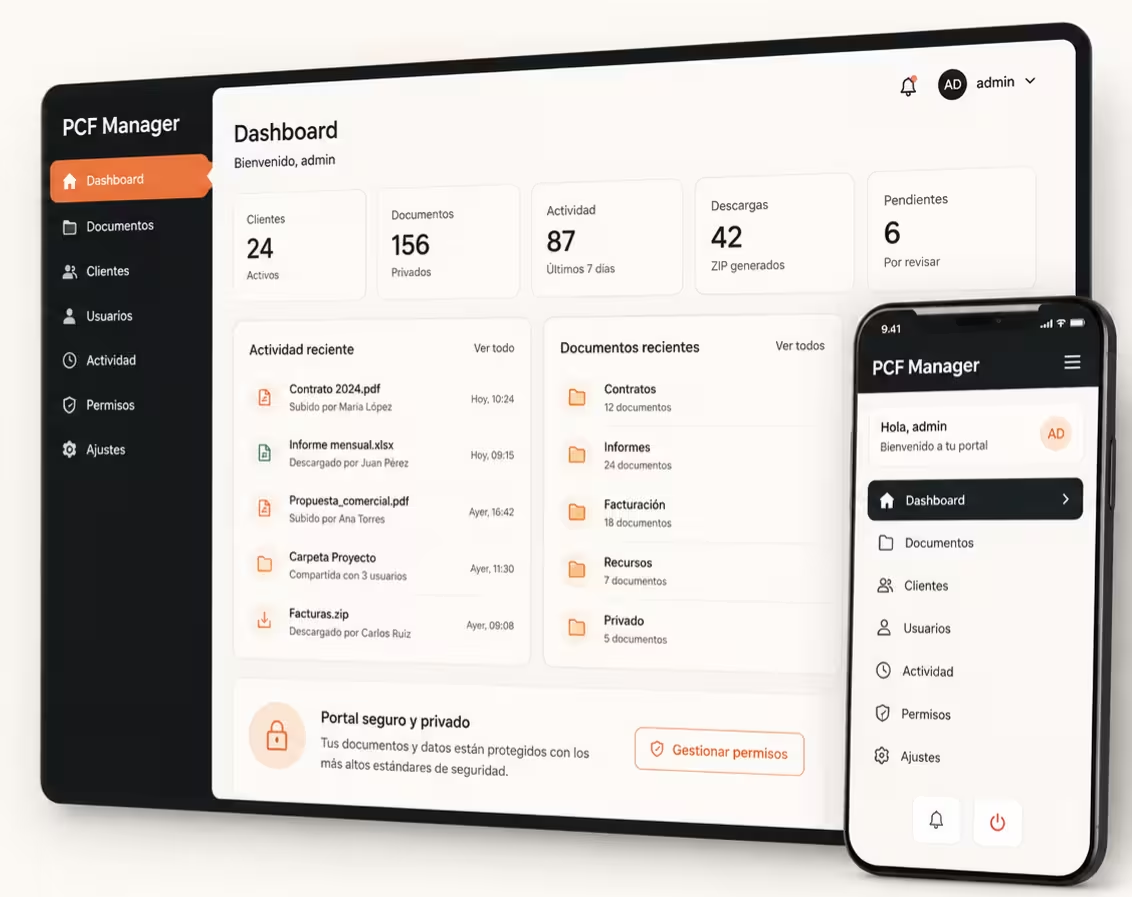
Administrators, managers and clients work with interfaces adapted to their permissions and responsibilities.
Organize documents by client, project, case file, service or any internal structure of the business.
Define who can view, upload, download, move, delete or manage files within the portal.
Shows files as cards or a list, with organized information and direct access to the available actions.
Lets you download folders, subfolders, selected files or entire accounts depending on permissions.
Records relevant activity, enables internal notifications and helps keep the document flow under control.
Pros and cons
Many companies still deliver confidential documents by email, external links or shared folders. PCF Manager solves that flow from WordPress, with your own branding, permissions, history and document control.
Most current solutions are good for sending files, but not for creating a private, organized and controlled document experience within the business’s website.
PCF Manager was born for a specific use case: turning WordPress into a private portal where administrators, managers and clients work with their own permissions, folders and dashboards.
For lawyers, administrative agencies, agencies, consultants, architects or administrative teams, the value isn’t just in uploading files: it’s in delivering private documentation with order, control, permissions and a branded experience inside WordPress.
License plans
All plans include the same plugin features. The difference is the number of licenses available to activate PCF Manager on one or several WordPress installations.
Single license
Professional license
Agency license
All licenses include the same plugin features. Advanced integrations, specific customizations or custom development may require additional setup depending on the project.
FAQ
Common questions about licenses, installation, permissions, storage, security and using the plugin.
PCF Manager is a WordPress plugin that lets you create private document portals for clients. It’s used to organize files, folders, subfolders, permissions, uploads, downloads and document activity from the frontend of your own website.
No. PCF Manager works inside WordPress. The portal, users, folders and document management are all administered from your own installation, without relying on an external SaaS to create the private portal.
A shared folder lets you store files, but it doesn’t offer a branded portal experience with roles, permissions, per-user dashboards, activity, notifications and document control integrated into WordPress. PCF Manager is designed to deliver documents to clients in an organized and professional way.
The system is designed for three main profiles: administrators, managers and clients. The administrator configures the portal and permissions; managers work with their assigned clients; and clients access their private space to view, upload or download documents according to their permissions.
Yes. Each client only accesses the information, folders and documents that belong to them. The system is designed to separate document areas by client and control which actions each user can perform.
Yes. PCF Manager lets you organize documentation with main folders and subfolders. This makes it easy to work by client, project, case file, service, year or any document structure the business needs.
Yes, as long as they have permission to do so. The administrator can define which users can upload files, which formats are allowed and which limits or conditions apply to the portal.
Yes. The plugin includes advanced ZIP downloads for folders, subfolders, selected documents or entire client accounts, as long as the permission settings allow it.
By default, PCF Manager uses local storage within WordPress. It can also be extended with SFTP or Google Drive synchronization for professional workflows that require external storage or synchronized copies.
The plugin is designed to manage private documentation with access control and permissions. Even so, final security also depends on the server configuration, WordPress, user roles, backups, SSL, internal policies and good administration practices.
All plans include the same plugin features. The difference is the number of licenses available: 1 site, 5 sites or 25 sites.
Subscribe to our newsletter