Truly lightweight
Under 6 KB of deferred JavaScript (gzip), no dependencies or third-party assets, and cache-friendly. Designed not to slow your site down.
Your professional website for 360 USD: domain, hosting, maintenance and 2 email accounts included the first year.
No lock-in contract, with real people behind it. We want you to be a happy client.
Give your business its own place on the internet. This is the offer to get started.

Free WordPress plugin
A lightweight cookie consent banner for WordPress: it does not slow your site down, scans cookies automatically and adapts to each brand's identity.
GDPR-ready, compatible with Google Consent Mode v2 and the WP Consent API, it keeps proof of every choice and is completely free.
Who it is for
What it solves
We built it because we needed a lightweight solution: many cookie banners delayed page loading and hurt the performance metrics Google measures.
Diáfana loads under 6 KB of deferred JavaScript, relies on no external services and still includes an automatic scan, manual cookies and an advanced style panel.
Under 6 KB of deferred JavaScript (gzip), no dependencies or third-party assets, and cache-friendly. Designed not to slow your site down.
With one click it crawls a sample of your pages and detects cookies and third-party services, such as analytics, pixels, fonts or embedded videos.
Add any cookie the scanner misses by hand, with wildcards, provider, category and duration, and create rules to block scripts by their URL.
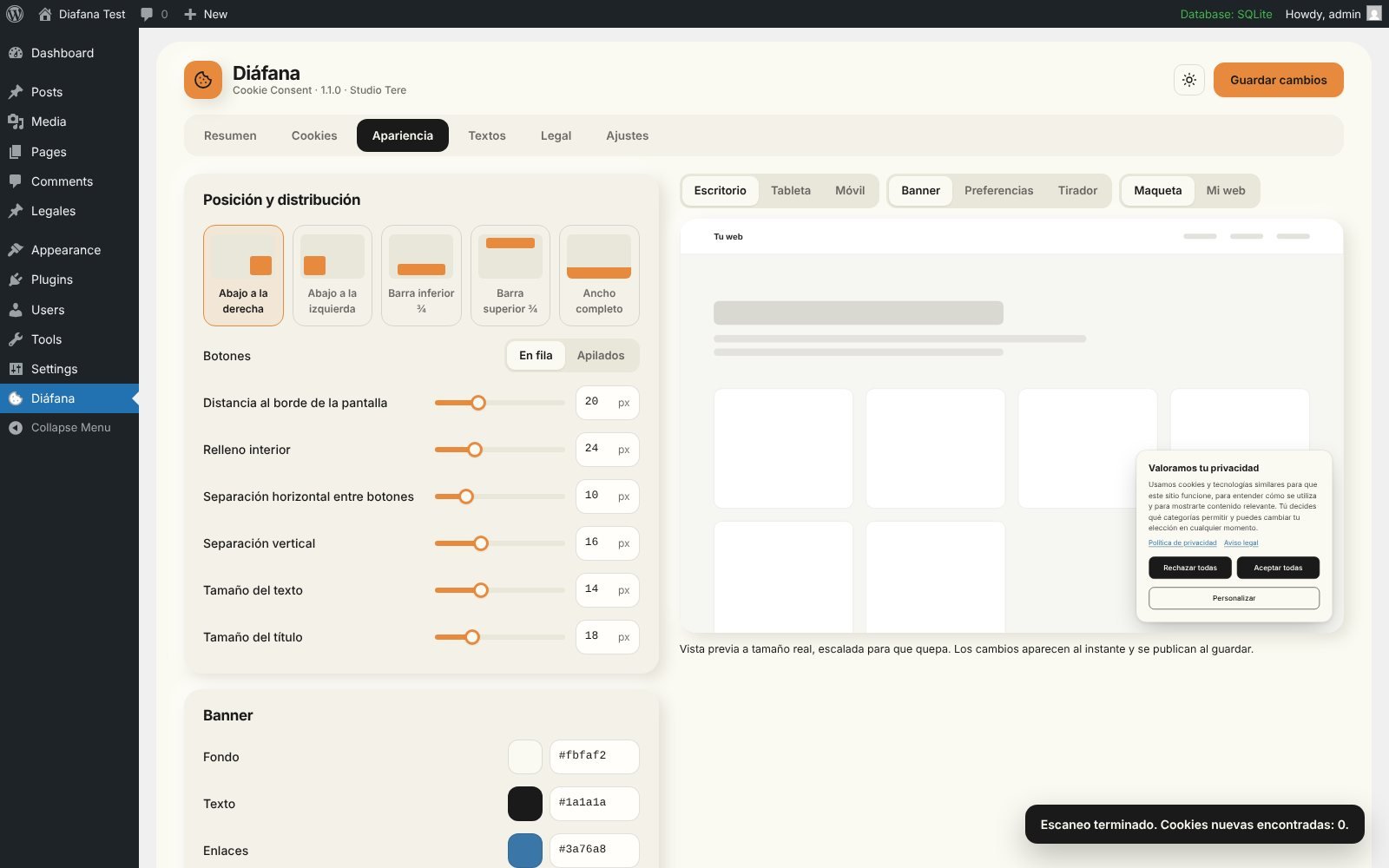
Colours, typography, position, borders, shadows and icon, with a real-size preview. Matching the banner to each brand's identity is quick and easy.
Recognised or classified services are blocked until consent, and the state is passed to Google Consent Mode v2 and the WP Consent API.
An optional log in your own database, without IP addresses: an ID the visitor can see, their choices, the date and a copy of the text shown.
Pros and cons
Many sites show a cookie notice that only looks compliant: scripts load before the visitor decides, or the consent log is only available on paid plans.
When an authority or a provider asks for evidence, a notice that only informs is not enough.
Diáfana runs entirely inside WordPress: no external accounts, no telemetry and no connection to Studio Tere.
Diáfana helps you comply with privacy laws, but it is not legal advice. It is not a Google-certified CMP and does not implement the IAB TCF, which Google requires to serve AdSense, Ad Manager or AdMob ads in the EEA, the UK and Switzerland.
Get started
Requires WordPress 6.9 or later and PHP 7.4 or later. The scanner is a sample, not a full audit: always check the real requests your site makes.
From Plugins → Add New in your WordPress, searching for "Diáfana", or by uploading the ZIP file.
In the Cookies tab, run "Scan site" to detect the cookies and services your site uses.
Review what was detected, classify anything unknown and choose what stays blocked until consent.
Adjust colours, position and texts in the Appearance tab, with the real-size preview.
In the Legal tab, link your privacy and cookie policies, enable the log and save.
Frequently asked questions
Common questions about compliance, performance, consent records and languages.
Yes. It is a free plugin published in the official WordPress.org directory under the GPL licence. There is no paid version, no visit limits and no external account.
Yes. Preferences, analytics and marketing are denied until the visitor enables them. Blocking covers recognised or classified resources and registered cookies; unknown or dynamically inserted resources need to be classified or blocked manually.
In your own WordPress database. Each acceptance, change or withdrawal is a new line with a random ID, the choices, the date, the language and a copy of the text shown. No IP address is stored. You can search by ID and export to CSV.
Yes. The default state is "denied" and it is updated when the visitor chooses. Diáfana is not a Google-certified CMP and does not implement the IAB TCF, which is required for AdSense, Ad Manager or AdMob ads in the EEA, the UK and Switzerland.
The banner uses under 6 KB of deferred JavaScript (gzip) and a cacheable local stylesheet. It loads no third-party assets, and cached pages can be shared between visitors.
Polylang, WPML, TranslatePress and Weglot are detected automatically. Every banner text can be edited per language.
No. Diáfana helps you comply with privacy laws, but your site's settings and legal texts should be reviewed for your specific case.
Complementary services
Depending on where your project is, we can help with web design, custom features, automation, maintenance or technical positioning.
If the project needs to grow after launch, we can add new layers without redoing everything from scratch.
Talk about the next stepSubscribe to our newsletter