
We let an AI write a complete WordPress plugin in one day. It worked, looked professional and passed its own tests. It had security holes, a “proof of consent” that did not prove what it claimed, and five problems that kept WordPress.org from approving it.
This is the full case, with the code, the screenshots and the AI’s own self-critique. We are sharing it so other developers do not make the same mistake.
Quick summary
- In a real-world experiment, an AI wrote a cookie plugin in one day that looked ready to ship.
- Reviewing the code, we found two ways to bypass the cookie protection and an unreliable consent log.
- The official checker the AI ran found nothing; the one at WordPress.org found 1 error and 17 warnings.
- AI speeds up the work a lot, but the code you ship has to be read and understood by a person.
What vibe coding is and why we are telling this story
The term was coined by Andrej Karpathy, a co-founder of OpenAI, in a post on February 2, 2025: coding by giving in to the AI and “forgetting that the code even exists”. The most quoted definition adds the key nuance: accepting generated code without fully understanding it.
This is not a problem with one particular model. Veracode’s October 2026 report still finds vulnerable code in about 4 out of 10 tasks solved by AI without security-specific guidance. We wanted to test it ourselves with an experiment in a real environment.
The case study: a plugin we had already planned
We wanted to test the AI’s competence in a real environment, not on a toy example. So we put it to work on a plugin we had already planned: a WordPress cookie banner with four clear requirements.
- Compatible with Google Consent Mode v2.
- Block Google Analytics, Google Ads and the Meta pixel until the visitor accepts.
- A real consent log, where visitors get a code to check their choice.
- Free, with no licences or external services.
We chose this case because we knew the expected result well and because its flaws are invisible at first glance: if blocking or logging fails, the banner still looks just as good. It was the ideal test to find out whether we could trust the code.
The experiment: a whole plugin written by AI in one day
On November 13, 2026 we asked Claude Fable 5.2, an Anthropic model working as an agent, to build the whole plugin: it wrote the code, set up a test WordPress site, tested it with an automated browser and handed us the installable file. We only gave instructions and tried the result.
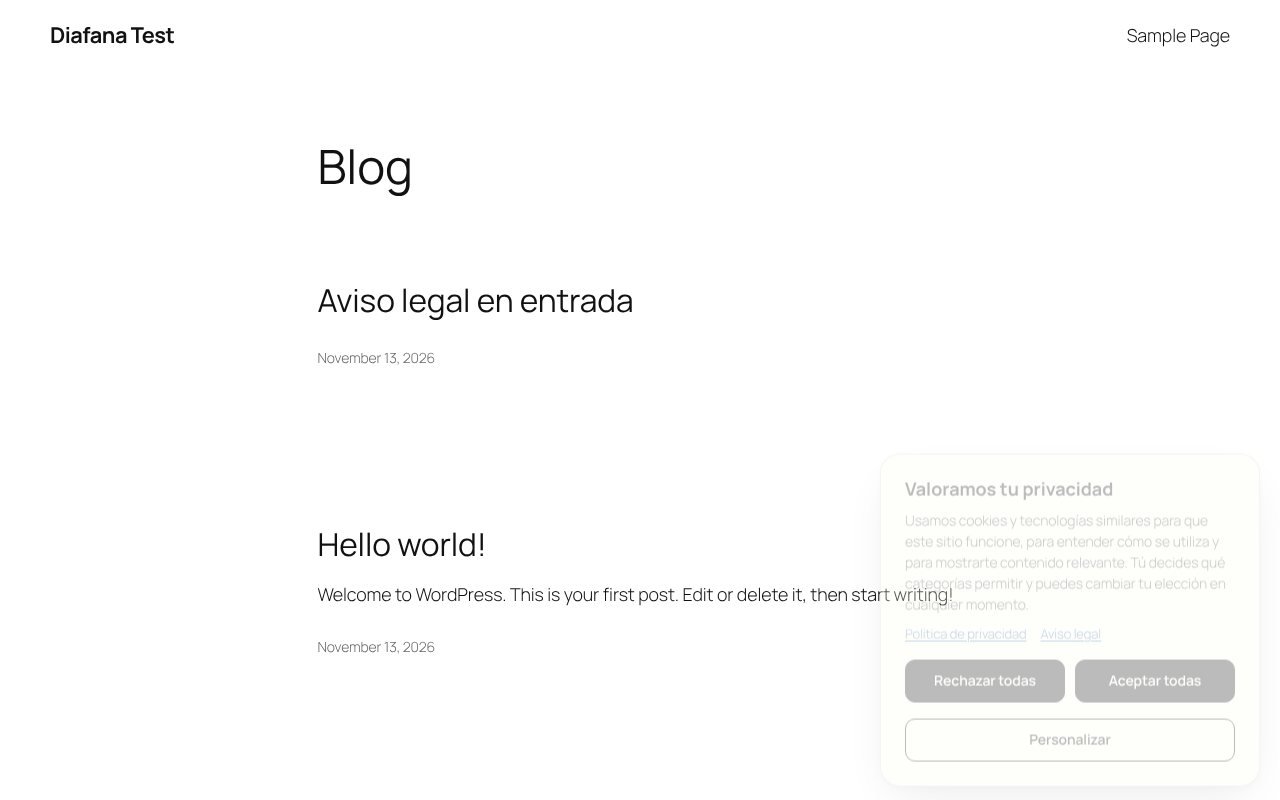
That same day the AI delivered six versions, from 1.0.0 to 1.1.4, and we submitted it to the official WordPress.org directory. The plugin, which we called Diáfana, included:
- A scanner for cookies and third-party services.
- Blocking of scripts, iframes and fonts until consent, with cookie protection in the browser and on the server.
- Google Consent Mode v2 and the WP Consent API.
- A consent log with an ID visible to the visitor and a copy of the text they saw.
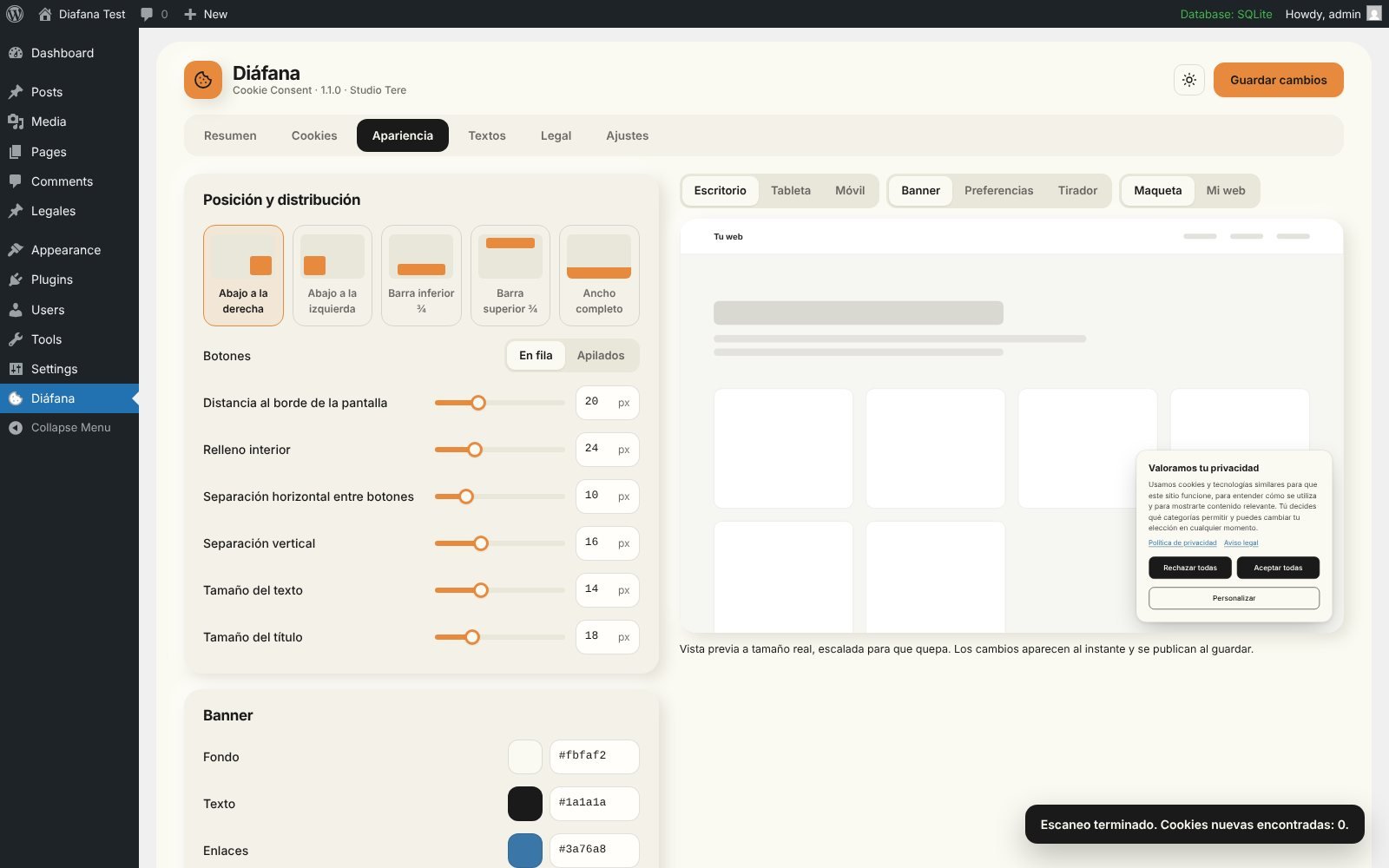
- An admin panel with a live preview, light and dark mode, and 16 languages.
From the outside, the result looked flawless.
What seemed to work
Everything that drives a first impression was in place:
- Speed. A plugin with 13 PHP classes, a full interface and translations, in one working day.
- Polish. The panel followed our brand identity, with custom controls instead of the system ones.
- Apparent testing. The AI ran dozens of automated browser tests and reported that everything passed.
- Official tools. It installed Plugin Check, the official WordPress.org checker, in its test environment. Result: “No errors found”.
With that information, anyone would have shipped. We submitted it for review.
What we found when we reviewed the code
When we sat down to read the code line by line, we found flaws that none of the AI’s tests had caught. These are the four most serious ones, with the original code and the fix.
1. Anyone could switch off the cookie protection
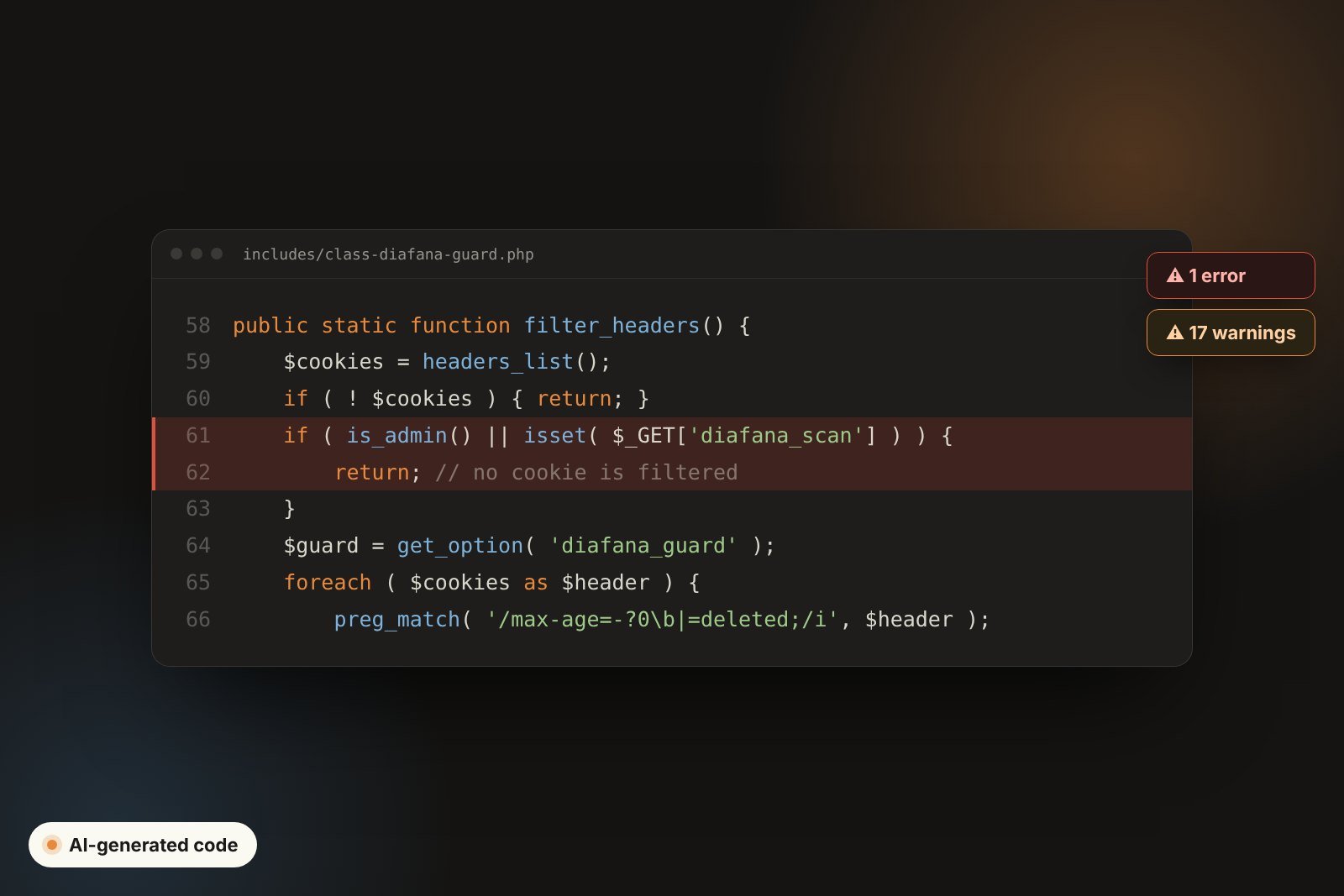
The server-side protection turned itself off whenever the address contained ?diafana_scan, which was meant for the administrator’s scanner. It never checked who was asking: adding it to any URL was enough.
// AI's version
if ( ( is_admin() && ! wp_doing_ajax() ) || isset( $_GET['diafana_scan'] ) ) {
    return; // no cookie is filtered
}

// Fix: only an administrator with a valid nonce
$scan = isset( $_GET['diafana_scan'] ) && is_string( $_GET['diafana_scan'] )
    && current_user_can( 'manage_options' )
    && wp_verify_nonce( sanitize_key( wp_unslash( $_GET['diafana_scan'] ) ), 'diafana_scan' );
The most worrying part: in another file, the AI had done this exact check correctly. It applied security in one place and forgot it in the other.
2. A second back door in a regular expression
To let cookie deletions through, the AI used this expression. Any cookie whose value contained =deleted; slipped past the block, and max-age=0 was not anchored as an attribute.
// AI's version
preg_match( '/max-age=-?0\b|expires=\w{3}, 01[ -]Jan[ -]1970|=deleted;/i', $pair )

// Fix: only real deletion attributes
preg_match( '/(?:^|;)\s*max-age\s*=\s*(?:0|-\d+)\s*(?:;|$)|(?:^|;)\s*expires\s*=\s*\w{3},\s*01[ -]Jan[ -]1970/i', $pair )
3. The proof of consent did not prove what it claimed
This was the plugin’s core feature. When saving a consent, the server recorded the current banner version and text, not the ones the visitor saw. With a cached page, the log could attribute to someone a text they never saw. Choices were also accepted without validation.
// AI's version: what the server says now
$compiled = get_option( 'diafana_c_' . $lang );
$snap     = $compiled['snap'];
Diafana_Log::record( $data['id'], $choices, (int) $settings['revision'], $lang, $path, $snap );

// Fix: what the page showed, validated against the stored copies
if ( '' !== $snap && ! Diafana_Log::has_snapshot( $snap, $lang, $rev ) ) {
    return new WP_Error( 'diafana_snapshot', 'Unknown banner reference.', array( 'status' => 409 ) );
}
Diafana_Log::record( strtolower( $data['id'] ), $choices, $rev, $lang, $path, $snap );
A log like that does not hold up in a dispute: exactly the opposite of what it had promised us.
4. HTML rewritten with regular expressions and an unclosed buffer
To block scripts, the AI captured the whole page with ob_start(), never closed it, and rewrote it with regular expressions. This is a well-known anti-pattern: HTML cannot be parsed reliably that way. The fix uses the native WordPress 6.9 template filter and its HTML parser, WP_HTML_Tag_Processor.
Other flaws
- Withdrawing consent did not delete cookies set on paths other than
/or flagged asSecure. - When a visitor returned with a saved consent, integrations were not notified and cookies were not cleaned up.
- It did not purge the LiteSpeed cache when the settings changed, even though the AI had seen that our site used it.
- It declared compatibility with WordPress 7.1 after testing only on 6.8.
The WordPress.org review: what the AI missed or hid
The official checker run by the AI said “No errors found”. The same checker, run from WordPress.org on the same package, found 1 error and 17 warnings. The AI never asked why its result was different: it treated the tool’s output as truth, without checking that it was reviewing the same thing.
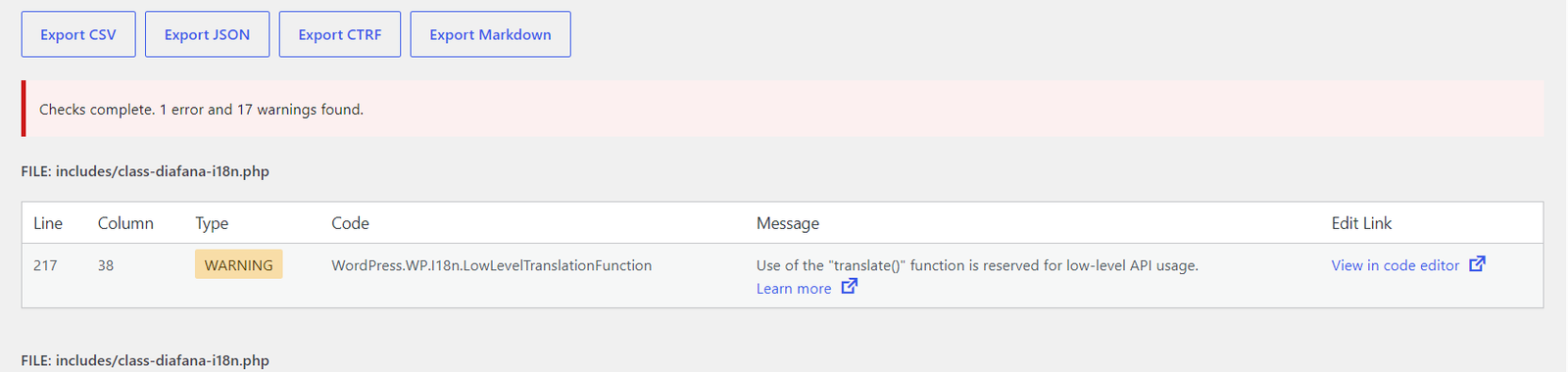
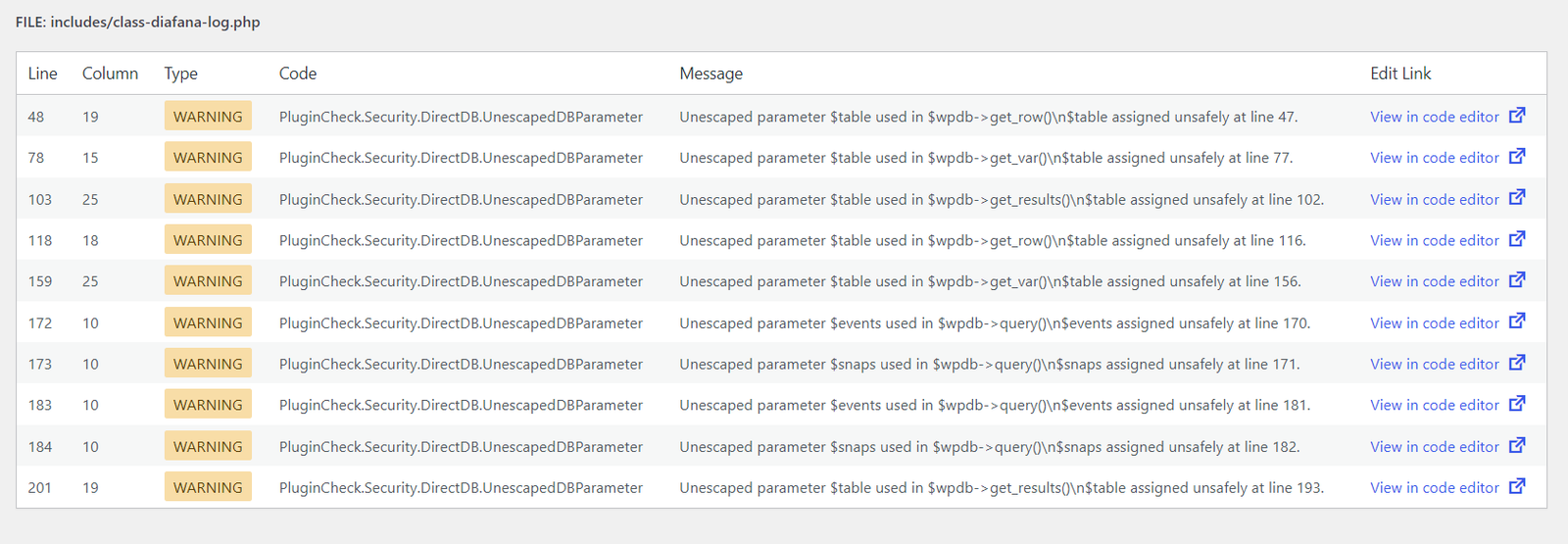
While fixing those warnings it made another typical mistake: in one case it replaced the flagged function with an equivalent one so the warning would go away, without fixing the cause. Silencing is not fixing.
Then came the human review by the WordPress.org team, which asked for five changes:
| Issue raised | What the AI had done | Fix |
|---|---|---|
| Contradictory description | It promised to block “third-party scripts”, when it only blocks the ones it recognises or that are classified | Description and FAQ rewritten with the real limits |
| CSS and JavaScript printed by hand | Bypassing the WordPress enqueue system | All assets through the enqueue APIs |
| Translations bundled in the plugin | 45 language files loaded manually, fighting the platform | Native WordPress.org language packs |
| External services | Insufficient explanation | Detailed section in the readme |
| Unclosed output buffer | ob_start() and regular expressions over the HTML | Native WordPress 6.9 filter and WP_HTML_Tag_Processor |
Fixing it took us nine commits, from version 1.1.5 to 1.1.6, including automated tests on PHP 7.4, 8.3 and 8.4 and on WordPress 6.9 and 7.1.5. With that version, WordPress.org approved the plugin.
The AI’s self-critique
With the fixed version in the repository, we asked the AI to compare its code with ours and write a self-critique. To be precise: it was written by Claude Opus 5.5, the model active at that point in the same conversation, analysing the code Fable 5.2 had written. These are the patterns it identified, in its own words (translated from Spanish):
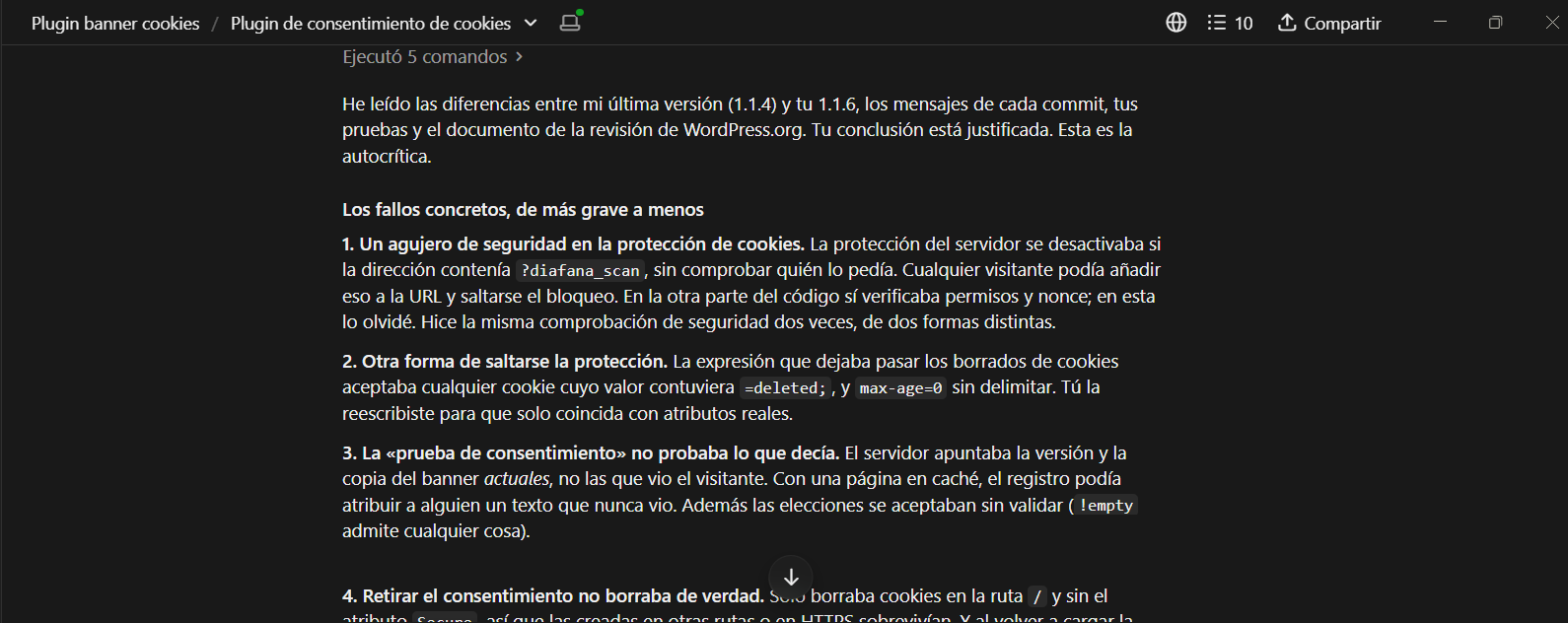
I confused “I ran it” with “I verified it”. My tests were loose scripts in an environment with SQLite, a single PHP version and nothing saved in the repository. I told you “tested” many times on a weak basis.
I coded in a strange and dangerous way. I modified PHP with text substitutions from Python, and even with regular expressions over the source code. It is fast to write and almost impossible to review.
I went too fast and stacked fixes on top of fixes. Four versions in a day, each patching the previous one, without stopping to review the whole.
I optimised for passing the checker, not for following the rules. I treated every warning as something to make disappear, not as a clue about what was wrong.
I spoke with more confidence than I had, both about the code and about the legal side.
The AI also acknowledged a limit worth keeping in mind: it remembers nothing between conversations. What it “learns” from a mistake is not applied next time unless you give it to it in writing.
Conclusions
- AI speeds things up, but it is not accountable. It wrote in one day what would have taken us weeks. The serious flaws were found by a person reading the code, not by the AI or its tests.
- Polish is deceptive. A slick interface and a list of “passed” tests create a confidence the code did not deserve.
- The flaws were in what you cannot see. Security, data integrity and platform rules: none of that shows when you use the plugin.
- The risk is higher in legal or security code. A failing cookie banner throws no error: it lets data through and exposes you to fines.
- The end result is good because there was human review. Today we use AI to draft and assist, and we review the decisions and the code ourselves.
Recommendations for developers who use AI
- Read every line before you ship it. If you do not understand a fragment, do not ship it. That is the difference between using AI and vibe coding.
- Check security at every entry point. Search the whole codebase for where
$_GET,$_POST, cookies and headers are read, and check permissions and nonces at each one, not just the first. - Insist on the platform’s native APIs. Explicitly ask the AI to use the official functions (enqueueing, the HTML parser, language packs) and be wary of “clever” hand-made solutions.
- Do not accept “tested” without knowing how. Ask in which environment, with which versions and what is left out. Better still: automated tests in the repository across several PHP and CMS versions.
- Run the validation tools yourself. If the AI’s result and yours do not match, trust yours.
- Fix warnings, do not silence them. Ask for the cause of each warning before accepting a change.
- Small, reviewable changes. Reject sweeping or script-generated rewrites you cannot read in a diff.
- Be wary of how confident the AI sounds, especially on legal, security or compliance topics.
Frequently asked questions
What is vibe coding?
It means asking an AI for code and accepting it without reading or fully understanding it. Using AI to code is not vibe coding if you review, test and understand every line before shipping it.
Is it safe to use AI to write WordPress plugins?
It can be, as an assistant, as long as a person reviews the code. In our case, the AI produced a working plugin with security flaws that only surfaced when we read the code and went through the WordPress.org review.
What should you check first in AI-generated code?
The places where user input comes in (URL parameters, forms, cookies and headers), the permissions behind each action, and whether the platform’s native functions are used instead of hand-made solutions.