
Black Friday 2026 falls on Friday, November 27, and Cyber Monday on Monday the 30th. If your business sells services or products, or captures leads through its website, there are fewer than four weeks left before one of the highest-traffic moments of the year. This guide explains how to prepare your website for Black Friday with a realistic calendar, what to check on the technical side and how to build a clear, honest offer.
Quick summary
- In 2025, Black Friday in the U.S. hit a record $11.8 billion in online purchases (+9.1%), according to Adobe. This is U.S. data, not data for your region.
- Start now: speed, forms, payments and fast support must be ready before you announce anything.
- An offer has to be understood in five seconds: what it includes, how much it costs and until when.
- Don’t invent urgency: a deadline only works if it’s real.
In this article
What happened in 2025: the data
According to Adobe Analytics, which tracks visits to U.S. e-commerce sites, Black Friday 2025 generated record online spending of $11.8 billion, 9.1% more than in 2024. The whole Cyber Week (from Thanksgiving to Cyber Monday) added up to $44.2 billion, up 7.7%, and Cyber Monday alone reached $14.25 billion. You can read the summary at BNN Bloomberg.
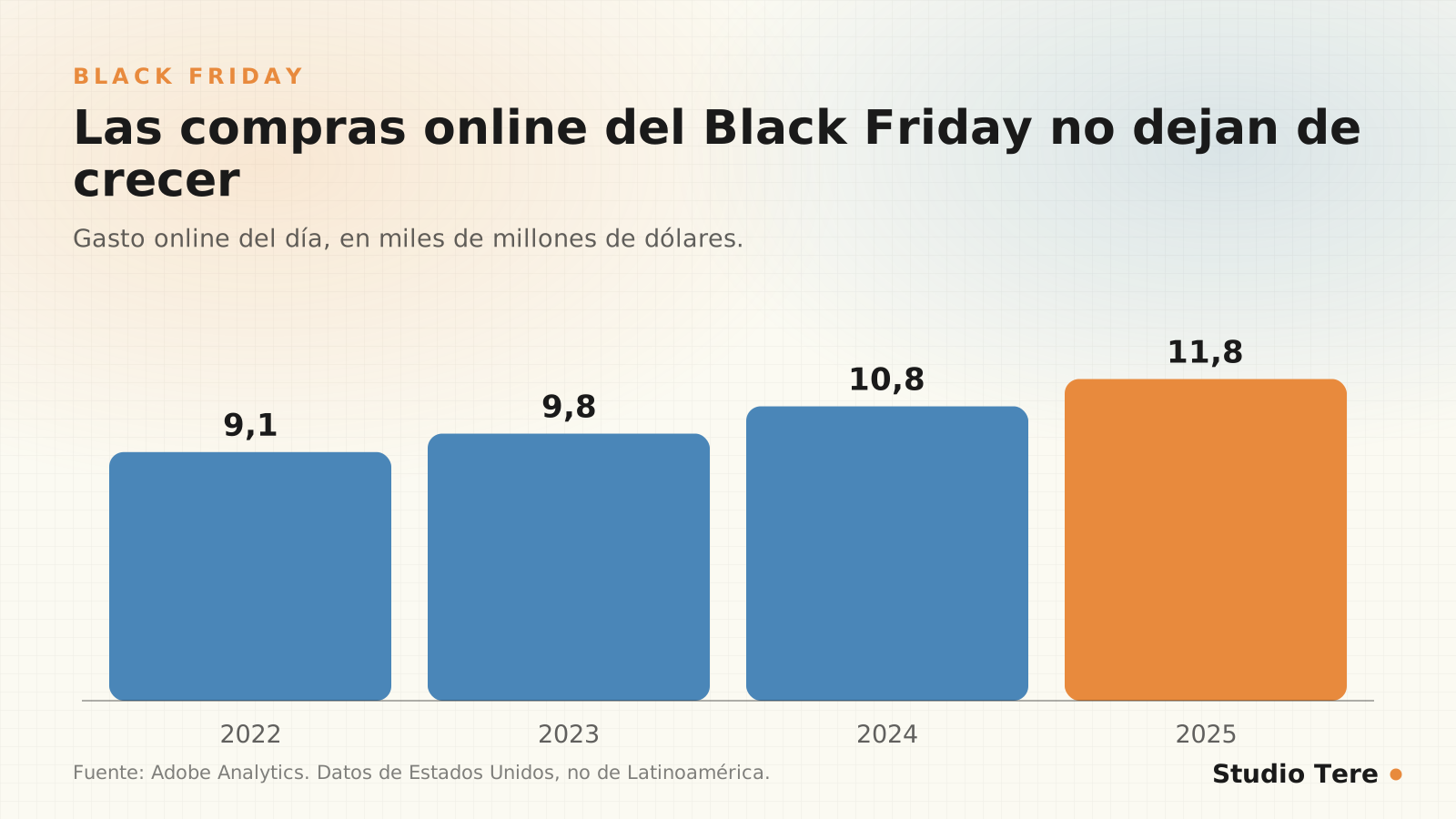
Important note: these are U.S. figures and can’t be carried over as-is to your market. What the trend does show is that more and more people expect online deals and compare before deciding. It also shows that more shopping happens from home and on mobile, so your website has to measure up on small screens.
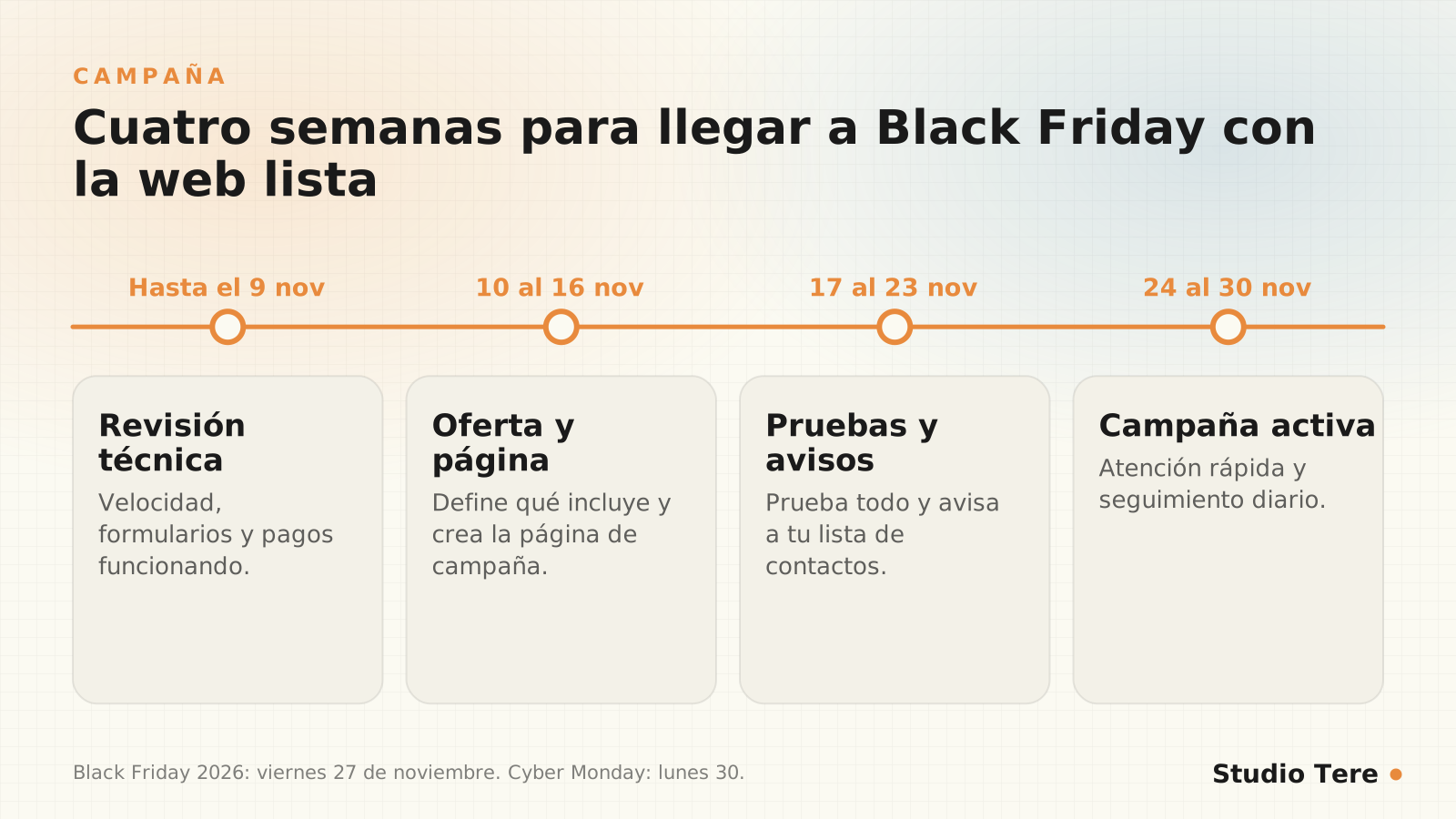
Four-week calendar
| When | What to do |
|---|---|
| Through November 9 | Technical review: mobile speed, forms, payments, backups and updates |
| November 10–16 | Define the offer, create the campaign page and prepare the copy and email |
| November 17–23 | Test everything with real cases and notify your contact list |
| November 24–30 | Active campaign: fast support, daily follow-up and targeted adjustments |
Define the offer so it’s understood in five seconds
- What’s included, exactly, and what’s left out.
- How much it costs, with the regular price and the offer price if there’s a real discount.
- Until when it’s valid and what happens afterward.
- How to sign up: a single button and the next steps explained.
- Clear terms that comply with the consumer regulations in your country.
An offer defends itself when it’s honest. A discount with an inflated “previous price” or a countdown that resets every time isn’t just bad practice: it destroys the trust you wanted to earn. To build the campaign page, see our guide to landing pages that convert.

Prepare the website: technical items first
- Mobile speed: measure your key pages and fix the heaviest elements (Core Web Vitals guide). 53% of mobile visits are abandoned if a page takes longer than three seconds.
- Forms and payments: test a real submission and a real payment from start to finish, and check that the notification arrives.
- Security and backups: update everything early and make a backup before freezing changes (security measures).
- Hosting: make sure it can handle traffic peaks; ask your provider.
- Freeze major changes in the week before: whatever hasn’t been tested doesn’t go live.
Fast support: the difference between selling and losing
During a campaign, whoever asks a question wants an answer right away. If your customer is on WhatsApp, offer a button with a prefilled message for each page and define who replies and how quickly. You’ll find the method in connecting WhatsApp, CRM and your website.
During the campaign: what to watch every day
- That the website is up and fast (a downtime alert avoids surprises).
- That forms and payments work: run a test every morning.
- The most repeated questions, to add them to the page as answers.
- Which channel brings the most leads (email, social, search engines, direct).
- Your team’s response time.
Afterward: close it out properly
- Say thank you and clearly confirm to those who signed up.
- Follow up with those who asked but didn’t buy.
- Note what you learned: what worked, which questions kept coming up, where visitors were lost.
- Review performance and backups after the peak.
If you don’t have a website yet: our Black Friday offer
If you were thinking of launching a website, this is our proposal: S@Y Digital, a fixed package with a design of up to 10 pages, domain, hosting, maintenance and two business emails for the first year, for 360 USD and with no lock-in. The current terms are always on the offer page. And if you’d rather compare before deciding, in how much a professional website really costs we explain how.
Frequently asked questions
When is Black Friday in 2026?
On Friday, November 27, 2026, the day after Thanksgiving. Cyber Monday is Monday, November 30.
How much time do I need to prepare?
Ideally four weeks, as in this guide’s calendar. If you have less, prioritize the technical items and a very clear offer.
Do I have to offer discounts?
Not necessarily. You can offer value in other ways (more services included, bonuses, payment terms), as long as it’s clear and honest.
Is U.S. data useful for my business?
It works as a sign of the trend, not as a forecast. Use your own data from previous years if you have it.
Can I prepare my website if I’m not technical?
Yes: with the checklist and with help on the technical side. The essential thing is to test from start to finish, as a customer would.
Launch your website this season with S@Y Digital
Design of up to 10 pages, domain, hosting, maintenance and two emails included for the first year, for 360 USD and with no lock-in. Check the current terms.