
Having WhatsApp, a CRM and a website isn’t worth much if each tool lives in isolation. The value appears when they share information without you having to step in: a customer writes from a service page, their contact is logged and the follow-up doesn’t depend on your memory. This guide explains how to connect WhatsApp, CRM and your website in a practical way, in what order to do it and what to watch so it doesn’t break.
Quick summary
- WhatsApp is the most widely used channel in Latin America: more than 92% of internet users in several countries use it (DataReportal, 2023).
- Start with the simple things: a WhatsApp button with a prefilled message and forms connected to the CRM.
- Every connection is a point that can fail: document, limit permissions and turn on alerts.
- Ask only for the data you need and keep a record of consent.
In this article
Why WhatsApp first
According to an analysis by DataReportal, We Are Social and Meltwater reported by Statista, WhatsApp was the most widely used social platform in Latin America in the third quarter of 2023, with more than 92% of internet users in the countries analyzed accessing the app. For many businesses in the region, it’s where the customer already is and where they prefer to ask questions before deciding.
That’s why, instead of asking them to fill in a long form, it’s often better to offer both options: a form for those who prefer it and a WhatsApp button for those who want to ask right away.
What to connect first
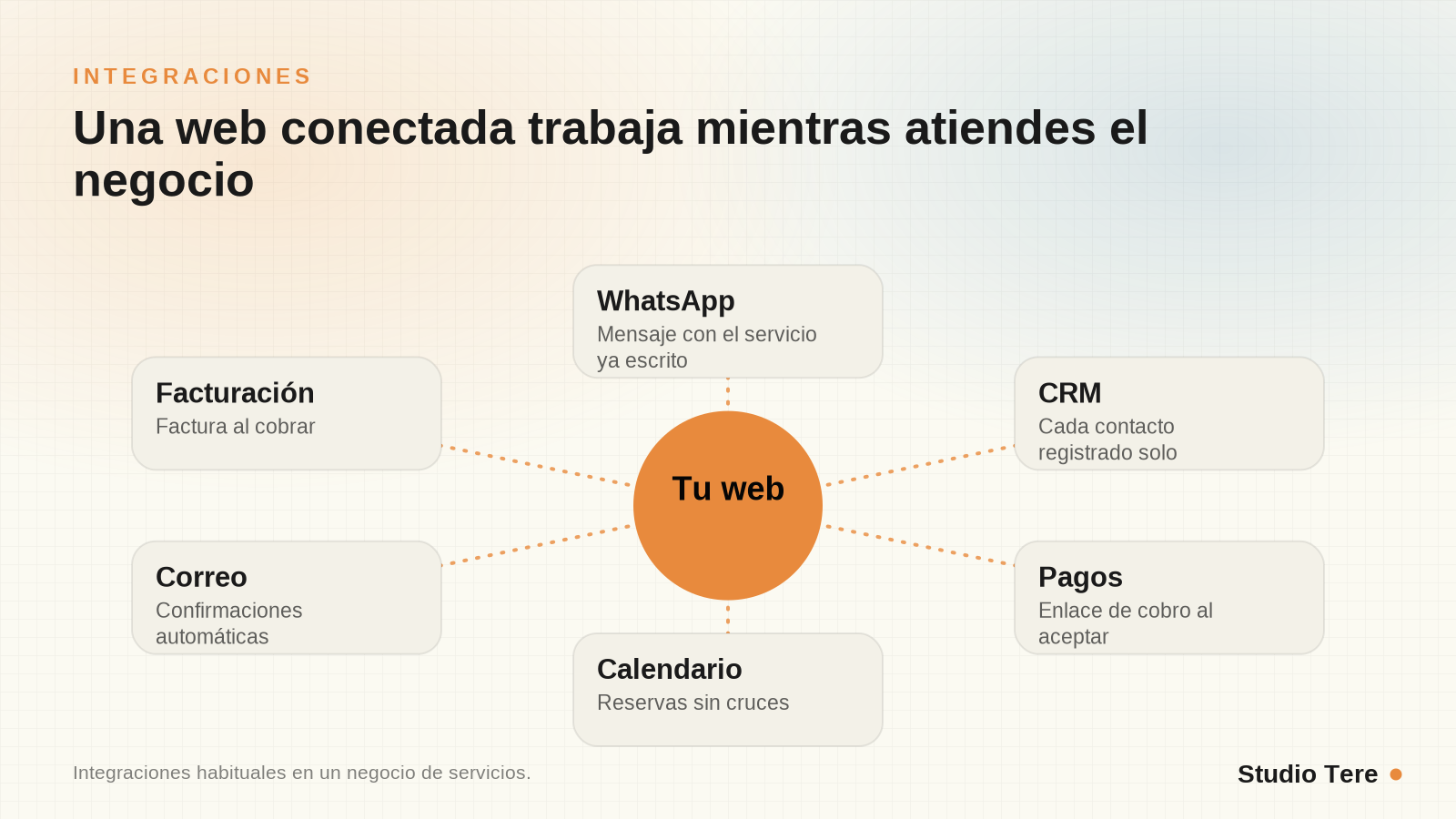
- Forms with the CRM: every request is logged without copying anything.
- WhatsApp buttons with a prefilled message depending on the page the visitor is on.
- Payments with invoicing and notifications to the customer.
- Bookings with your calendar, to avoid double-bookings and manual confirmations.
WhatsApp on your website: three levels
| Level | What it is | Ideal for |
|---|---|---|
| 1. Direct link | A button that opens a conversation with your number, with an optional message | Any business, no cost and no code |
| 2. WhatsApp Business (app) | The app for businesses: profile, catalog, labels and quick replies | Small businesses with a small team |
| 3. WhatsApp Business Platform (API) | Programmatic connection to automate messages, with approved templates and its own costs | High volume or automated processes |
For most websites, level 1 is enough and is the one that delivers results fastest. The higher levels have rules, costs and approval processes of their own from Meta, so it’s wise to weigh them carefully.
The prefilled message: a small detail that changes a lot
A direct WhatsApp link can include an initial text. That way, whoever taps the button arrives with the message already written and you know which page they came from. The format is:
https://wa.me/NUMERO?text=MENSAJE-CODIFICADO

Ejemplo:
https://wa.me/50767500817?text=Hola%2C%20quiero%20informaci%C3%B3n%20sobre%20el%20mantenimiento%20web
Use a different message on each page to learn which content generates conversations:
| Page | Prefilled message |
|---|---|
| Maintenance | Hi, I’d like information about website maintenance |
| Web design | Hi, I’d like a proposal for my website |
| Custom solutions | Hi, I need to automate a process |
| Campaign offer | Hi, I’m interested in the website offer |
Logging contacts in the CRM
A CRM is, in essence, your business’s memory: who each contact is, what they asked for, where they stand and what needs to be done. For it to do its job, requests must flow in without friction:
- From the form: the data travels to the CRM at the moment of submission (see the example in our guide to automating quotes).
- From WhatsApp: with the direct link, your team logs the contact in one click; with the API, it can be automated.
- With labels: service of interest, source (website, WhatsApp, referral) and status.
- With follow-up reminders, so no request goes cold.
A complete flow, from visit to payment
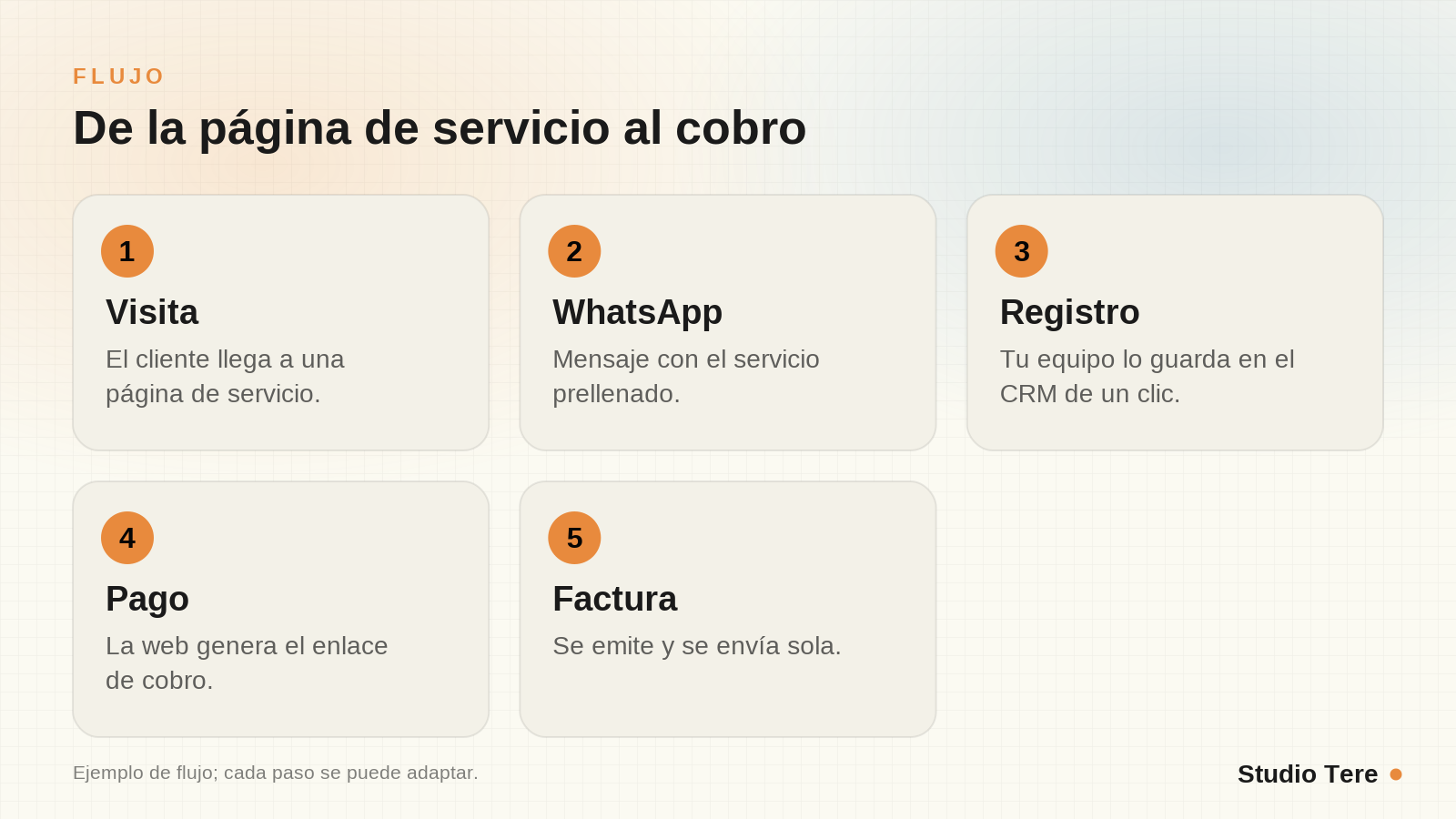
- A visitor taps the WhatsApp button from a service page.
- The message arrives with the service name already written.
- Your team replies and logs the contact in the CRM in one click.
- When the customer accepts, the website generates the payment link.
- When payment is received, the invoice is issued and sent.
Payments and calendar
Once contacts are flowing, the next step is usually to get paid and schedule. An automatically generated payment link avoids back-and-forth, and connecting bookings to your calendar avoids double-bookings. If your project includes a store or recurring payments, it’s best to design it from the start, as we explain in our guide to how much a professional website costs.
Fragile connections: how to avoid nasty surprises
Every connection between tools is a point that can fail without making a sound. These habits reduce the risk:
- Document how it’s set up: what connects to what and who is responsible.
- Use credentials with minimum permissions and store them in a password manager, not in loose documents.
- Turn on alerts so you find out the same day that something stopped working.
- Test the full flow after every change, with a real case.
- Plan a manual route in case a tool goes down.
- Respect privacy: ask only for the data you need and keep a record of consent.
Frequently asked questions
Do I need the WhatsApp API to serve my customers?
No. For most small businesses, a direct link and the WhatsApp Business app are enough. The API is for high volumes or specific automations.
Can I tell which page each conversation comes from?
Yes: use a different prefilled message on each page and, if you need to, add a reference in the text.
Which CRM is right for me?
The one your team will actually use. Prioritize one that allows data import and export, has form integration and whose cost grows reasonably.
Is it legal to store my customers’ phone numbers?
It depends on your country’s regulations and how you obtain them. Ask only for what’s necessary, state what they’re used for and record consent.
How long does it take to set up a basic integration?
A WhatsApp button with per-page messages, in hours. A form connected to the CRM, in days. More complex integrations require design and testing.
Want your website, WhatsApp and CRM to work together?
We design the connections that really save time, with alerts and documentation, without adding unnecessary tools.
Sources and recommended reading