

Changing platforms is scary for good reason: a poorly done migration can make your website lose rankings for months, and sometimes it never fully recovers. The good news is that almost every migration disaster has known, avoidable causes. This guide explains how to migrate your website to WordPress without losing rankings, step by step, with a plan you can follow whether you do it yourself or hire it out.
We draw on Google’s documentation about URL changes and site moves, and on the order in which, in practice, it makes sense to do things: first measure, then decide, then build and, only at the end, publish.
Quick summary
- Take inventory before moving anything: all URLs, the ones that get the most traffic and their titles.
- Keep URLs whenever you can; if they change, create a one-to-one 301 redirect to the equivalent page.
- Build in a staging environment with noindex and don’t forget to remove it on launch day.
- Google recommends keeping redirects for as long as possible, generally at least a year.
- Watch Search Console daily for the first few weeks.
In this article
Why a migration can sink your traffic
A search engine understands your website through its addresses and what’s on each one. If you change addresses, content or technical configuration all at once, it has to relearn everything. The failures that cost the most traffic are:
- URLs that change without a redirect, and become 404 errors for Google and for your visitors.
- Mass redirects to the homepage, which Google may treat as soft errors and which don’t pass relevance.
- The forgotten search engine block on the new site (the “discourage search engines” checkbox or a restrictive robots.txt file).
- Trimmed content: titles, text or pages that ranked and disappear.
- A slower website than the previous one, which worsens the experience and the metrics.
- Internal links and sitemap not updated, still pointing to the old addresses.
Before moving anything: inventory and baseline
You can’t protect what you don’t measure. Before touching anything, save a complete snapshot of your current website:
| What to capture | Where to get it | What it’s for |
|---|---|---|
| Complete list of URLs | A crawler (such as Screaming Frog) and your sitemap | Basis of the redirect map |
| Pages with the most impressions and clicks | Search Console, performance report | Knowing what to protect first |
| Pages with the most visits | Your analytics | Prioritizing tests and redirects |
| Incoming external links | Search Console, links report | Avoiding the loss of valuable links |
| Titles, descriptions and H1s | Crawl export | Keeping what already works |
| Current speed | PageSpeed Insights | Not worsening the starting point |

Decide which URLs to keep
The best redirect is the one you don’t need. If your new website can keep the same addresses, do it: it’s the lowest-risk path. In WordPress, the permalinks setting (Settings, Permalinks) lets you reproduce many old structures.
- Keep the same structure, capitalization and trailing slash when possible.
- Change only one thing at a time: if you can, don’t change domain, platform and URLs in the same step.
- If any URL has to change, do it for a clear reason (better structure) and not for aesthetics.
The 301 redirect map
Every old URL that changes needs a permanent (301) redirect to the equivalent new page. Prepare a table before launch:
| Old URL | New URL | Type |
|---|---|---|
| /servicios.html | /servicios/ | 301 |
| /quienes-somos.html | /nosotros/ | 301 |
| /contacto.php | /contacto/ | 301 |
| /novedades.html | /blog/ | 301 |
Golden rules
- One by one, to the equivalent page. Don’t send everything to the homepage.
- A single hop. Google can follow redirect chains, but recommends going straight to the final destination and keeping chains short (ideally, no more than three hops).
- If a page disappears with no replacement, it’s legitimate to return a 404 or 410; don’t redirect it to something irrelevant.
- Update internal links so they point to the new URLs, without going through the redirect.
How to write them
On an Apache server you can use the .htaccess file; on Nginx, the site configuration. There are also plugins that manage redirects from the dashboard, although at scale it’s better to do it at the server level.
# Apache (.htaccess)
Redirect 301 /servicios.html https://tudominio.com/servicios/
RedirectMatch 301 ^/blog/([0-9]{4})/([0-9]{2})/(.*)$ /blog/$3

# Nginx
location = /servicios.html { return 301 /servicios/; }
Build in a staging environment
Never build on the production site. Use a staging environment protected with a password or, at a minimum, blocked to search engines. That avoids two problems: your half-built website showing up on Google and competing with the original for duplicate content.
The risk is on launch day: the search engine block stays active. It’s the hardest mistake to forgive. Include it as the only task on a final checklist.
Content parity and signals
The new website doesn’t have to be identical, but it must not lose what gave it value. Compare page by page:
- Titles and H1s of the pages that rank, with no unnecessary changes.
- Main text and the questions each page answers.
- Images with alt text and existing structured data.
- Internal links, breadcrumbs and site map.
- Performance: the new website must not be slower (see our Core Web Vitals guide).
- Analytics and conversion tracking tags active.
Launch day: checklist
| Moment | Task |
|---|---|
| 48 hours before | Lower the DNS TTL; freeze content changes; test forms and payments |
| Right before | Full backup of both websites; review the final redirect map |
| At launch | Point the domain, activate redirects, remove the search engine block |
| Immediately after | Test the most important old URLs, the sitemap, HTTPS, forms, email and analytics |
| First hours | Submit the new sitemap to Search Console and watch for errors |
After launch: monitoring
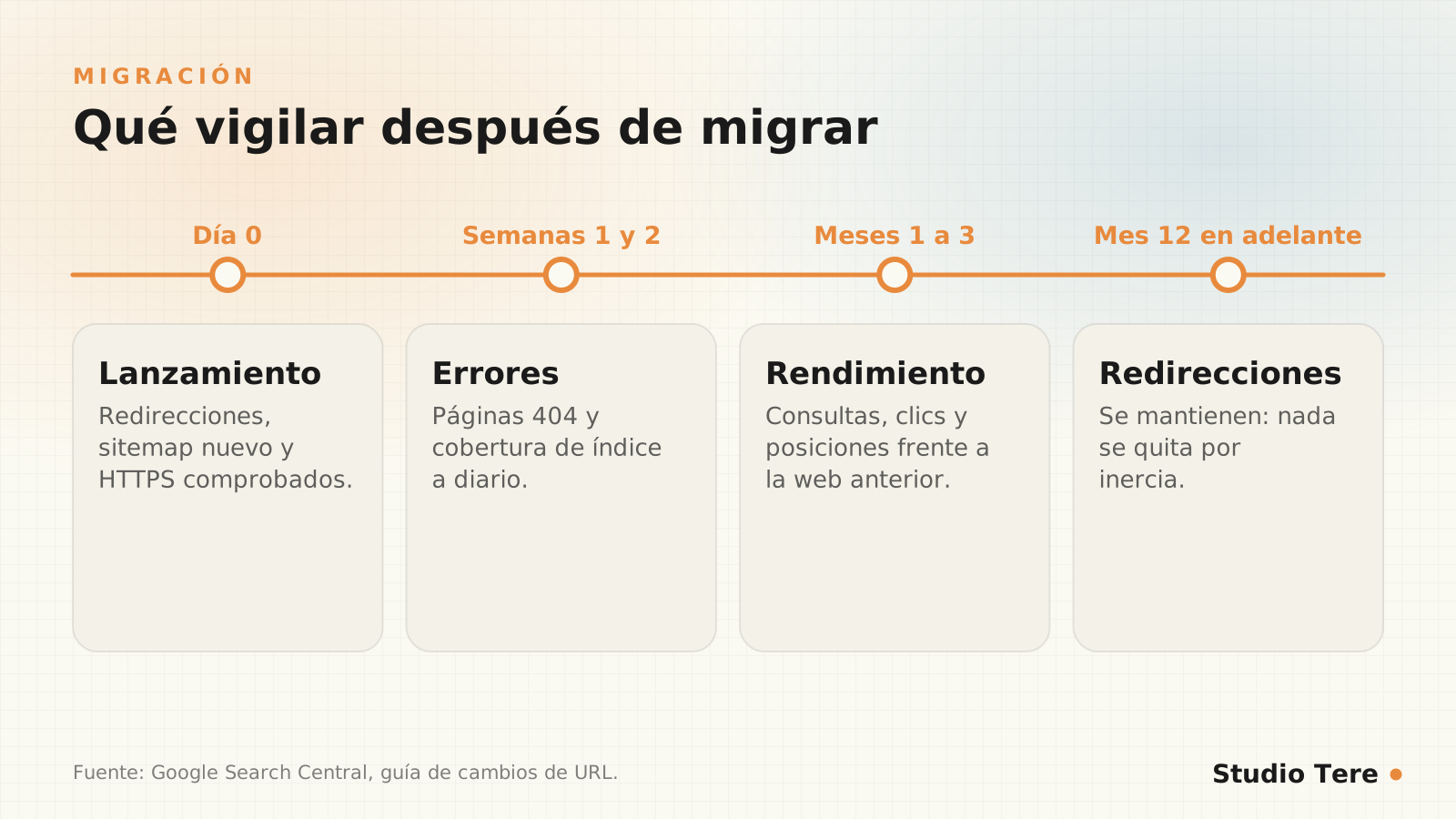
- Search Console: the page indexing report and 404 errors, daily for the first few weeks.
- Performance: compare clicks and impressions against the baseline you saved.
- Your own crawl: crawl your website again to find broken redirects and old internal links.
- External links: if a valuable link points to a URL with no redirect, fix it.
And don’t remove redirects out of inertia. Google’s guide on site moves with URL changes says to keep them “for as long as possible, generally at least one year,” because Google needs to crawl each URL several times to register the change. For users, it’s even advisable to keep them indefinitely.
If you also change domain
Changing domain adds steps: redirects from every URL on the old domain to the new one, verifying both domains in Search Console and using the Change of Address tool. Its help page says to keep redirects for at least 180 days, while the site move guide recommends a year or more: go with the longer period. And keep the old (paid) domain for at least that long.
Mistakes that cost traffic
- Leaving the search engine block active after launch.
- Redirecting everything to the homepage.
- Redirect chains (A to B to C) instead of direct hops.
- Changing titles and text on the pages that ranked best.
- Not updating the sitemap or internal links.
- Launching without a baseline to compare against.
- Removing redirects after a few months.
Frequently asked questions
Will I lose rankings when I migrate?
A well-done migration can have temporary fluctuations, but it doesn’t have to cause a sustained drop. What causes one is almost always losing URLs, content or technical configuration.
How long does Google take to recognize the change?
It depends on the size of the site. Google processes moves URL by URL, so it can take from weeks to a few months. That’s why you need to keep the redirects and keep watching.
Should I change domain and platform at the same time?
If you can, no. The fewer simultaneous changes, the easier it is to detect and fix problems.
What do I do with pages that will no longer exist?
If they have a reasonable equivalent, redirect them to it. If not, it’s fine for them to return 404 or 410; avoid redirecting them to irrelevant pages.
Can I migrate without taking my website down?
Yes: you build in a staging environment and publish all at once when everything is verified, with DNS prepared so the switch is fast.
Are you about to migrate and don’t want to gamble with your rankings?
We plan the migration with an inventory, a redirect map and follow-up monitoring, so you can change platforms without losing what already works.