
Launching a new website without reviewing the technical side is the fastest way to lose rankings you spent years earning, or to never earn any in the first place. This guide is a technical SEO checklist before launching your new website: everything you need to check so search engines can crawl, understand and index your site, explained with examples and official Google sources.
A necessary clarification: technical SEO doesn’t rank a site on its own. It’s the foundation. As we explain in our technical SEO and ranking service, you don’t rank an entire website, you rank specific searches; but without a sound technical foundation, even the best content doesn’t get a fair chance.
Quick summary
- Check, in this order: crawling (robots.txt, sitemap), indexing (noindex, canonical, HTTP codes) and experience (speed, mobile, HTTPS).
- The costliest mistake: launching with the staging environment’s search engine block still active.
- Titles of 40 to 60 characters and descriptive URLs improve click-through rate (Backlinko).
- Set up Search Console on launch day and watch it for the first two weeks.
In this article
- What technical SEO is
- Before publishing
- Crawling
- Indexing
- URLs and internal linking
- Titles and headings
- Images, performance and mobile
- Structured data
- Search Console
- WordPress settings
- After launch
- Mistakes that cost rankings
- Express audit
- Multiple languages
- JavaScript
- Pagination and archives
- What to fix first
- Frequently asked questions
What technical SEO is and why you review it before launch
Technical SEO brings together everything that helps a search engine access your website, understand its content and show it to the right people. You can think of it as the path each page travels before someone clicks:
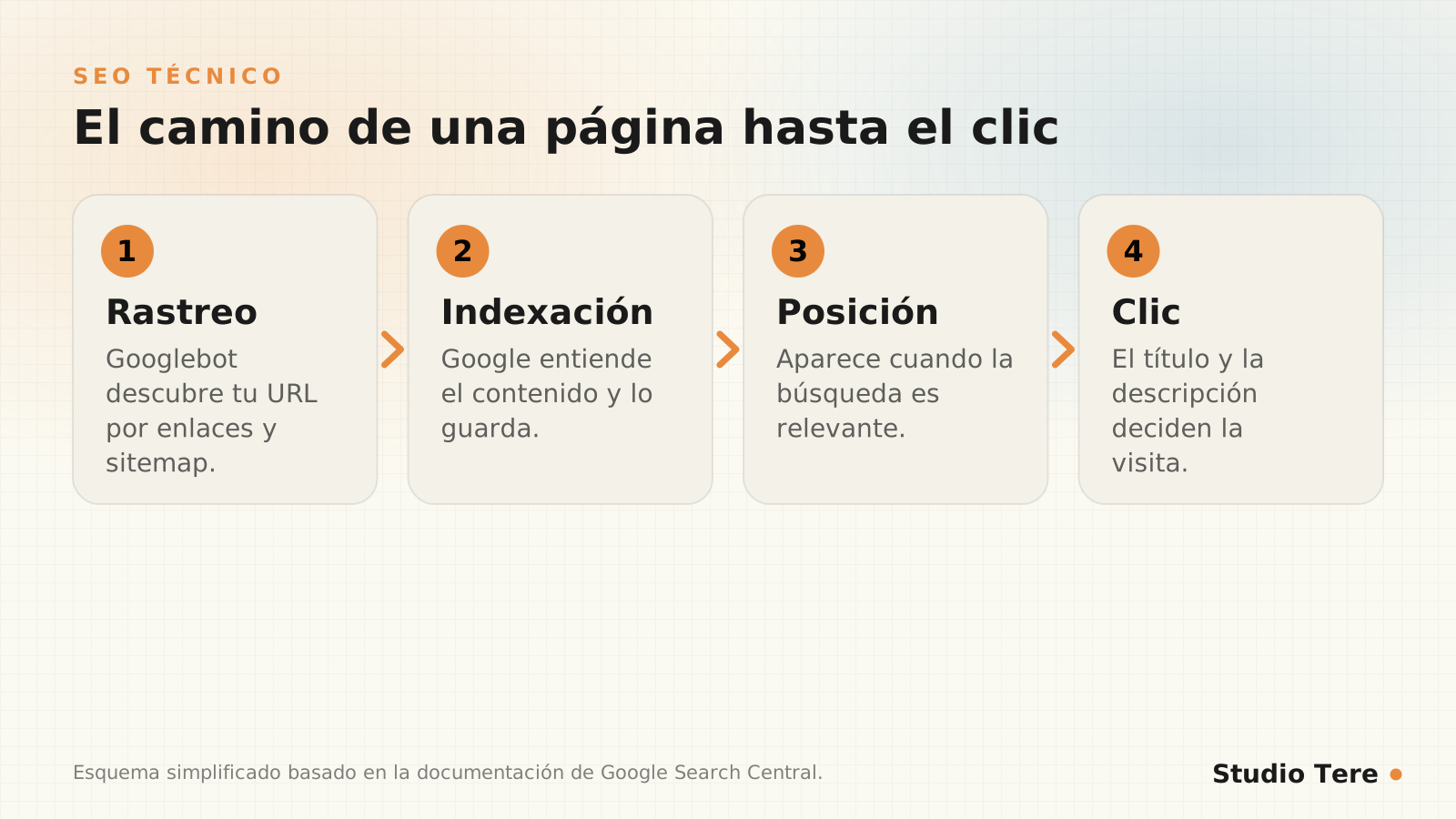
It matters especially before launch because that’s when it’s easiest to fix. Once the site is live, every error becomes pages that Google has already visited (or couldn’t visit), and recovering takes weeks. Google’s own SEO starter guide is the best general reference.
Before publishing: the essential checklist
These are the checks we run before every launch. Tick them off one by one:
| Check | How to do it | Why it matters |
|---|---|---|
| Search engine blocking is turned off on the live site | In WordPress: Settings, Reading, the “discourage search engines” checkbox; and review robots.txt and meta robots | It’s the most common cause of invisible websites after launch |
| Every page has a unique title and a description | Site crawl or SEO plugin | It’s what shows up in the results |
| There is a single H1 per page and a logical hierarchy | Code inspection or crawl | It helps understand the topic of each page |
| All images have alt text | Crawl or manual review | Accessibility and image search |
| HTTPS works and everything redirects to HTTPS | Test http and https with and without www | It avoids duplicate content and security warnings |
| The website works well on mobile | Real test on a phone | Google crawls and evaluates the mobile version |
| There are no broken internal links | Site crawl | Better experience and better crawling |
Crawling: robots.txt and sitemap
The robots.txt file tells crawlers which parts of your website they can visit (see Google’s introduction to robots.txt). A mistake here can hide your entire website. Here is a correct example for WordPress:
User-agent: *
Disallow: /wp-admin/
Allow: /wp-admin/admin-ajax.php

Sitemap: https://tudominio.com/sitemap.xml
Notice what must not appear: Disallow: / would block the whole site. It’s an innocent-looking line that, copied from staging to the live site, makes the project disappear.
The sitemap is a list of the URLs you want to be known. It should include only indexable pages (no redirects or errors), update only when you publish and be submitted from Search Console.
Indexing: what gets stored and what doesn’t
Google visiting a page doesn’t mean it stores it. Three elements control indexing:
- Noindex tag: explicitly asks for a page not to be indexed. Useful for internal pages with no value for search engines; dangerous if it stays where it shouldn’t.
- Canonical URL: indicates which is the main version when there are several very similar ones (see how to consolidate duplicate URLs).
- HTTP response code: 200 (all good), 301 (moved permanently), 404 or 410 (doesn’t exist) and 5xx (server error).
<link rel="canonical" href="https://tudominio.com/pagina/">
<meta name="robots" content="index, follow">
Beware of so-called soft errors: pages that return 200 but have almost no content (for example, an internal search with no results). Google may treat them as 404 errors.
URLs and internal linking
- Short, readable, stable URLs with the main term. According to Backlinko, those containing terms from the search get 45% more clicks.
- A clear hierarchy: few layers and important pages a few clicks from the homepage.
- Descriptive internal links between related pages, with text that explains where they lead.
- No orphan pages: every page should have at least one link from another.
- Breadcrumbs in sections with several levels.
If your website already exists and you change URLs, don’t skip this step: we cover it in migrating your website to WordPress without losing rankings.
Titles, descriptions and headings
They’re the first thing a person sees in the results and the ones that most influence whether they click. A fact to take seriously: according to Backlinko, the first Google result gets around 27.6% of clicks, while according to Sistrix, second-page results get less than 1% each.
- Title: between 40 and 60 characters is the range where Backlinko observed the best click-through rate. Google sets no official limit, so prioritize clarity. More in its guide to title links.
- Description: an honest summary of about 140 to 155 characters that invites clicks.
- H1: one per page, consistent with the title.
- H2 and H3: describe the content of each section; don’t use them just for styling.
To write content that deserves those clicks, there’s a guide at how to write content that ranks.
Images, performance and mobile
- Images: correct size, compression, modern formats (WebP or AVIF) and descriptive alt text.
- Speed: according to the 2025 Web Almanac, only 48% of sites pass Core Web Vitals on mobile. You’ll find all the detail in Core Web Vitals: what to measure and how to improve your LCP.
- Mobile first: Google mainly indexes the mobile version. Important content must be there too.
- HTTPS: essential, with no mixed content.
Structured data: helping machines understand
Structured data describes content in a format machines understand (see Google’s introduction). It isn’t a ranking trick, but it helps interpret the page and, in some cases, enables rich results. A simple article example:
<script type="application/ld+json">
{
  "@context": "https://schema.org",
  "@type": "Article",
  "headline": "Título del artículo",
  "datePublished": "2026-10-13",
  "author": { "@type": "Organization", "name": "Tu empresa" }
}
</script>
Always validate the result with Google’s Rich Results Test, and don’t mark up as structured data anything that isn’t visible on the page. Many WordPress SEO plugins (such as Slim SEO, Yoast or Rank Math) generate this data automatically.
Search Console and measurement
- Verify your site in Google Search Console (domain property, if possible).
- Submit the sitemap and check that it reads without errors.
- Review the page indexing report: what gets indexed and what doesn’t, and why.
- Look at Core Web Vitals and the page experience results.
- Set up your analytics with events for your conversions (forms, WhatsApp clicks, purchases).
Specific WordPress settings
- Permalinks: use the post name structure and don’t change it later without redirects.
- Reading settings: check that the site is visible to search engines.
- SEO plugin: just one, well configured, for titles, descriptions, sitemap and structured data.
- Sample content: delete the post, page and comment that WordPress creates by default.
- Categories and tags: decide which ones get indexed; tags without their own content are usually noise.
- Attachment and author pages: check that they don’t generate nearly empty indexable pages.
After launch: what to watch and when
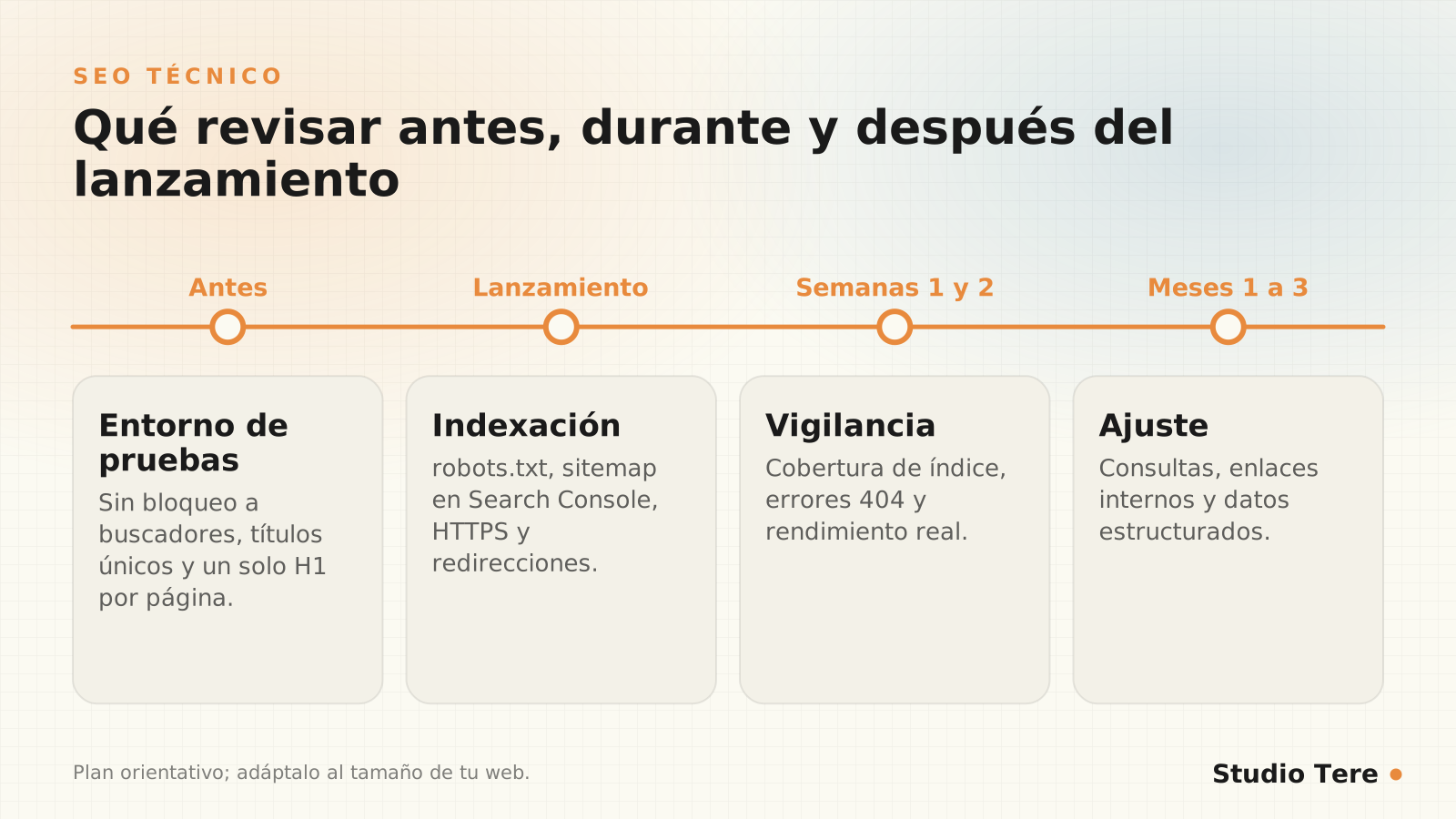
- Weeks 1 and 2: check Search Console daily: indexing, 404 errors, performance.
- Months 1 to 3: review the queries you appear for and improve the titles of pages with many impressions and few clicks.
- Every quarter: crawl the site again to detect broken links and orphan pages.
Mistakes that cost rankings
- Launching with
noindexorDisallow: /active. - Redirecting all old URLs to the homepage.
- Duplicate titles and descriptions across many pages.
- Sitemaps with redirected, blocked or error pages.
- http, https, with and without www versions, all accessible without redirection.
- Important content loaded only through scripts the crawler doesn’t run.
- Not setting up Search Console until “something goes wrong.”
30-minute express audit
If you don’t have time for a full audit, this quick review catches the most serious problems in half an hour:
- Search
site:yourdomain.comon Google. How many pages appear? Does it match what you expect? Are there pages that shouldn’t be there? - Open
yourdomain.com/robots.txtand confirm it doesn’t block the entire site. - Inspect the homepage code: title, description, a single H1, canonical and no noindex.
- Check Search Console: page indexing report and submitted sitemaps.
- Measure the speed of the homepage and of a service page in PageSpeed Insights.
- Test the URL variants (http, https, with and without www): they should all end up at one.
- Look for internal 404 errors with a quick crawl or from Search Console.
- Open the website on a real phone and go through the main pages.
Multilingual websites: hreflang
If your website exists in more than one language or country, the hreflang attribute tells Google which version corresponds to each audience. Each page must link to all its versions, including itself, and the references must be reciprocal:
<link rel="alternate" hreflang="es" href="https://tudominio.com/es/pagina/">
<link rel="alternate" hreflang="en" href="https://tudominio.com/en/page/">
<link rel="alternate" hreflang="x-default" href="https://tudominio.com/">
The most common mistakes: references without reciprocity, incorrect language codes and unreviewed machine-translated versions, which add little value.
Content that depends on JavaScript
Google can run JavaScript, but content that appears only after running scripts takes longer to process and is more fragile. Check, with Search Console’s URL inspection, that important content (text, internal links, titles) appears in the rendered HTML. As a rule, the essentials should arrive in the initial HTML and not depend on a user action.
Pagination, filters and archives in WordPress
- Paginated archives: each page should be accessible with clear links between them; don’t point all of them to the first with a canonical.
- Filters and parameters (order, color, price): prevent them from generating thousands of nearly identical indexable URLs.
- Internal searches: noindex is usually appropriate, because they generate pages with no value of their own.
- Tags with little content: either enrich them or don’t index them.
- Attachment and author pages without content: they shouldn’t be indexable.
What to fix first
| Priority | Examples | When |
|---|---|---|
| Critical | Search engine blocking, accidental noindex, site down, broken redirects | The same day |
| High | Duplicate titles, 404s on important pages, incorrect sitemap, misconfigured HTTPS | That week |
| Medium | Structured data, internal linking, images without alt text, speed | In the coming weeks |
| Low | Fine-tuning of titles and descriptions, tag cleanup | When there’s time |
Frequently asked questions
How long does Google take to index a new website?
It can range from a few days to several weeks. Submitting the sitemap from Search Console and having clear internal links speeds up the process, but there’s no guaranteed timeframe.
Is technical SEO enough to rank?
No: it’s the foundation. To rank you need content that answers what people search for and, over time, authority. But without a sound technical foundation, everything else is wasted.
Do I need an SEO plugin in WordPress?
One is highly recommended (Slim SEO, Yoast, Rank Math or another) to manage titles, descriptions, sitemap and structured data. One is enough: don’t install several at once.
What do I do if my page shows as “crawled but not indexed”?
It usually indicates low-value content, duplicated or very similar to other pages. Improve the content, strengthen internal linking and wait for it to be re-evaluated.
How often should I review technical SEO?
Intensively during the first two weeks after a launch and, afterwards, a quarterly review with a full crawl.
Want us to review your website before you launch it?
We do a complete technical review (crawling, indexing, structure and performance) and deliver a prioritized plan. Without promising rankings that nobody can guarantee.
Sources and recommended reading
- Google Search Central: SEO starter guide
- Google Search Central: introduction to robots.txt
- Google Search Central: sitemaps overview
- Google Search Central: canonical URLs and duplicates
- Google Search Central: structured data
- Backlinko: Google CTR study
- Search Engine Journal: Sistrix study on clicks
- HTTP Archive: Web Almanac 2025